Files and documents from a run
Which API lets an agent run code that produces PNG charts, PDFs or other files and returns them in the response? Shotcup's run API. The program writes its files under /out, and the answer to POST /api/v1/runs lists every one with its path, type and size: a file up to 32 KiB comes back inside the answer, and a file up to 16 MiB also gets a link. The MCP tools and the SDK answer the same way.
An artifact is a file the run hands back for people or programs, such as a chart, a PDF, a spreadsheet or a data file. It is not a build output.
curl https://shotcup.dev/api/v1/runs \
  -H "Authorization: Bearer $SHOTCUP_API_KEY" \
  -H "Content-Type: application/json" \
  -d '{"engine": {"canvas": true}, "entry": "/main.js", "code": "import { createCanvas } from \"shotcup:canvas\";\nconst chart = createCanvas(320, 160, \"#ffffff\");\nchart.fillRect(40, 40, 240, 80, \"#577111\");\nchart.save(\"/out/bar.png\");"}'
The answer's run.artifacts lists each file. This is the entry of the chart in the files below, recorded on 1 November 2026, its base64 and link cut short:
{
  "path": "/out/chart.png",
  "bytes": 29604,
  "contentType": "image/png",
  "inlineBase64": "iVBORw0KGgo…",
  "url": "https://shotcup.page/a/….png",
  "urlExpiresAt": "…"
}
What a run can write
| File | What makes it | Where it is described |
|---|---|---|
| PNG, JPEG | shotcup:canvas (engine: { canvas: true }): canvas.save("/out/chart.png"), toPNG(), toJPEG() | Canvas |
| GIF, APNG | shotcup:canvas: encodeGIF, encodeAPNG, saveAnimation | Canvas: animation |
| SVG, and SVG rendered to PNG | SVG is text the program writes; decodeImage of an SVG and .render() draws it into a canvas | SVG |
| a JavaScript writer sent with the run | below | |
| Word, Excel, PowerPoint | JavaScript writers sent with the run, on shotcup:zip | below |
| ZIP | shotcup:zip: zip(entries), and unzip(bytes) to read one | below |
| HTML, Markdown, CSV, JSON, any text | the program writes the string; React or MDX render HTML from a copy sent with the run | below |
| Any other bytes | fs.writeFileSync(path, bytes) with a Uint8Array |
Shotcup has no built-in PDF or Office module: those files come from code that travels with the run, so you can read and change it, and nothing is installed. A link serves its file with the type the file's extension names.
How a script writes a file
Anything the program writes under /out comes back with the answer. Create the directory first:
import fs from "fs";

fs.mkdirSync("/out", { recursive: true });
fs.writeFileSync("/out/summary.csv", "region,total\nDACH,39847.50\n");
Files elsewhere in the run's filesystem stay in the run: they show in its diff, not as artifacts. A canvas's save writes the file in one call, and a writer's bytes go out with fs.writeFileSync.
Images: PNG, JPEG, GIF and SVG
shotcup:canvas draws with a Canvas 2D context, real fonts and colour emoji, and encodes PNG, JPEG, GIF and APNG itself; it exists in a run that sends engine: { canvas: true }. It also reads SVG: decodeImage of an SVG file's bytes returns an image that drawImage takes and .render({ width }) turns into a canvas, so a run can write an SVG and hand back a PNG of it. The Canvas and SVG pages have every call and limit.
PDF, Word, Excel and PowerPoint
These files are written by JavaScript writers that you send with the run as files, next to the program. A PDF writer puts the document's objects and its cross-reference table into bytes; Word, Excel and PowerPoint files are zip archives of XML parts, so their writers build the parts and pack them with shotcup:zip. The launch templates carry small ones: lib/pdf.js in SVG, PDF and Markdown report (text, lines, rectangles and an image), lib/docx.js in Word report (.docx), lib/xlsx.js in Excel sheet (.xlsx) (strings, numbers and formulas with their cached values) and lib/pptx.js in PowerPoint deck (.pptx). The templates live in the @shotcup/templates package, which is not published to npm yet.
import fs from "fs";
import { buildXlsx } from "./lib/xlsx.js";

const bytes = buildXlsx({
  title: "Orders", author: "Shotcup", created: "2026-11-01T00:00:00Z",
  sheets: [{ name: "Orders", rows: [["Region", "Revenue"], ["DACH", 39847.5]] }],
});
fs.mkdirSync("/out", { recursive: true });
fs.writeFileSync("/out/orders.xlsx", bytes);
A link to a .docx, .xlsx, .pptx or .zip file downloads it instead of opening it in the browser.
ZIP
import { zip, unzip } from "shotcup:zip" needs no engine switch. zip([{ path, data }]) returns the archive's bytes, data as text or bytes; unzip(bytes) reads one (an upload, a URL import, a .docx) and refuses an archive that does not add up, naming the entry.
HTML, text and data
Text is the program's own string: CSV, JSON, Markdown or HTML written with fs.writeFileSync. A page rendered with React or MDX needs the library's copy sent with the run as files, as the React server-rendered document template does with React 19's renderToStaticMarkup. shotcup:html reads HTML and writes it as Markdown (HTML).
Inline or a link
- A file up to 32 KiB comes back inside the answer:
inlineas text when it is UTF-8, elseinlineBase64. - Every file up to 16 MiB gets a
urlon Shotcup's artifact host,shotcup.page, which serves user files and nothing else. The link may answer202for a moment while a large file is stored. - A run's files carry at most 24 MiB of content together, counted as it travels (base64 is a third larger). A file past either limit comes back by path and size alone, and the run's
warningsincludeartifact-content-omitted. - A run's files together stay within the plan's filesystem quota: Free 4 MiB, Pro 16 MiB, Scale 64 MiB, Platform 64 MiB.
Private files and how long links last
A link is a capability URL: anyone holding it can fetch the file without your API key until the plan's retention ends (Free 1 day, Pro 7 days, Scale 30 days, Platform 90 days), so treat it as private. Send "artifacts": "private" with the run and the links answer only your API key (Authorization: Bearer); everyone else gets 404. With "retention": "none" nothing is kept: files come back inline only, and a larger one by path and size without a link.
Over MCP: images in the answer
The MCP tools answer with the run as text, every file with its link, and add each PNG, JPEG, GIF, WebP and APNG file under /out up to 1 MiB as an image the client can show, at most 4 of them. Private images still come back inline. The MCP guide has the tools.
The data goes to the run as a file
The data goes to the run as a file, never through the model: a short program turns a thousand rows into a chart, a report or a spreadsheet. The model writes the program; your code attaches the data, and only the program's output goes back to the model. A run gets files four ways:
- in the request's
files, as text or base64 ({ path, content, encoding }); - as an upload:
POST /api/v1/uploadsgives an upload URL, and the request names the stored file as{ path, upload }, which keeps large files out of the request body; - by URL:
{ path, url }is downloaded before the run, per file at most Free 2 MiB, Pro 10 MiB, Scale 12 MiB, Platform 12 MiB; - from a drive mounted into the run, read-only or read-write, with versions.
Files from real runs
Each file below came from a real run on Shotcup, recorded through the API, run twice with the same answer and the same bytes. A picture of a PNG, JPEG or GIF is the file itself; a PDF's page was rendered with pdftoppm, an Office file's first page with LibreOffice and an HTML page's top in Chromium, and a ZIP is shown as its listing.
PNG: a chart
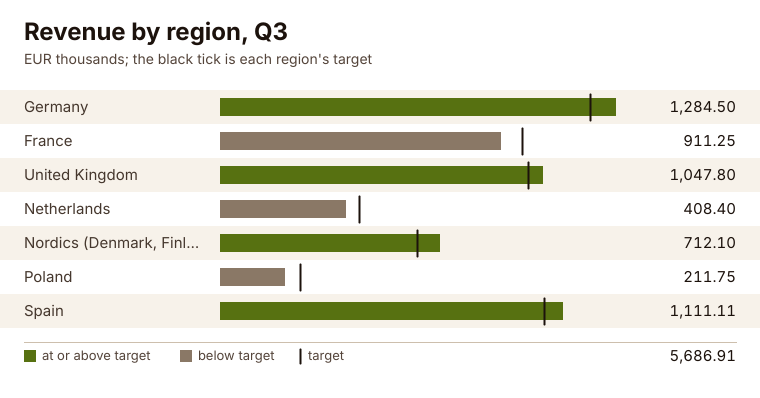
- Made by:
shotcup:canvas - Program: 87 lines; input:
/data/revenue.json, 590 bytes - File:
/out/chart.png, 29,604 bytes, inline in the answer and as a link - A real run on 1 November 2026. The picture: the file itself.
JPEG: a card with real fonts and colour emoji
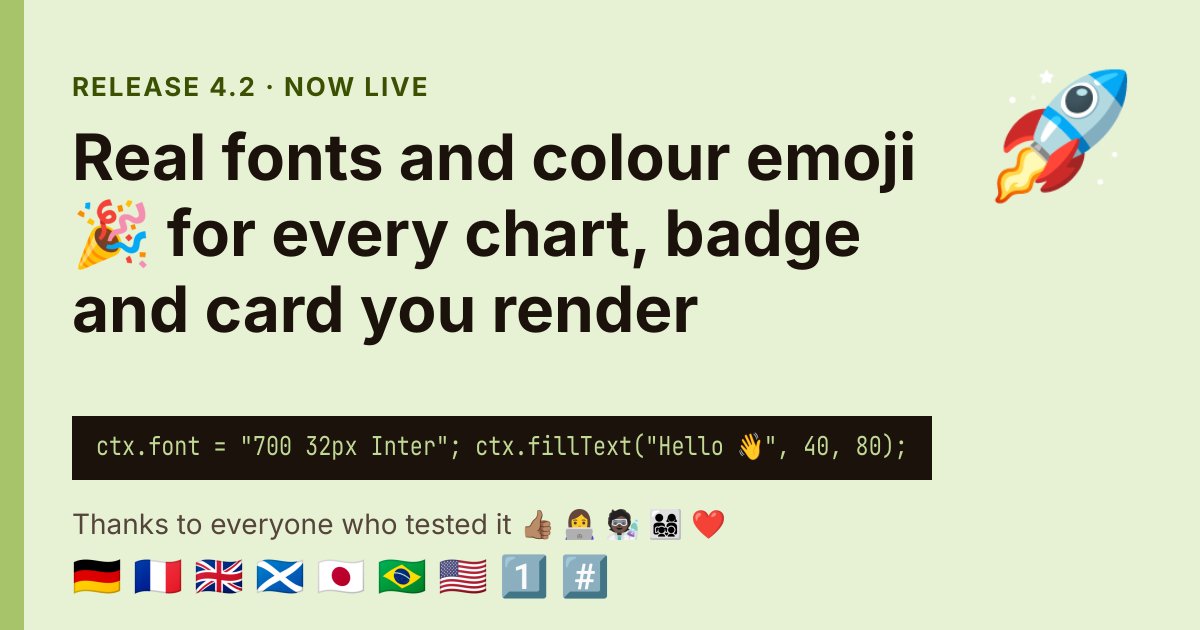
- Made by:
shotcup:canvas - Program: 76 lines; input:
/data/release.json, 498 bytes - File:
/out/card.jpg, 84,920 bytes, as a link - A real run on 1 November 2026. The picture: the file itself.
GIF: an animation

- Made by:
shotcup:canvas - Program: 36 lines; input: none, the data is in the program
- File:
/out/cup.gif, 27,800 bytes, inline in the answer and as a link - A real run on 1 November 2026. The picture: the file itself.
SVG to PNG: an SVG, rendered
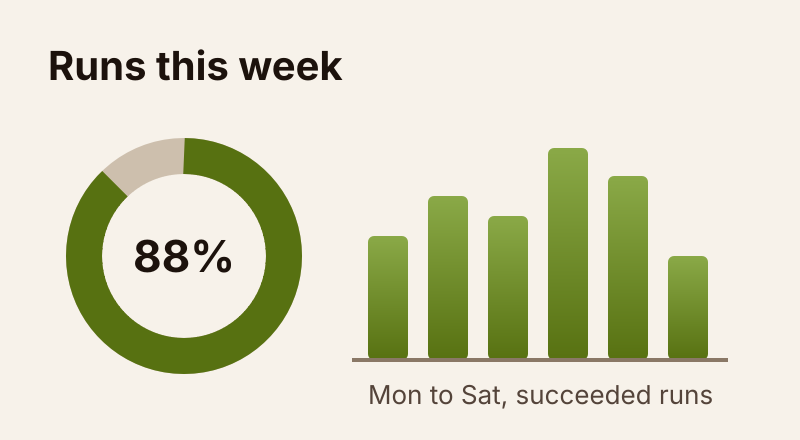
- Made by:
shotcup:canvas - Program: 8 lines; input:
/art/runs.svg, 1,375 bytes - File:
/out/runs.png, 25,721 bytes, inline in the answer and as a link - A real run on 1 November 2026. The picture: the file itself, the PNG the run rendered from the SVG.
PDF: a one-page report
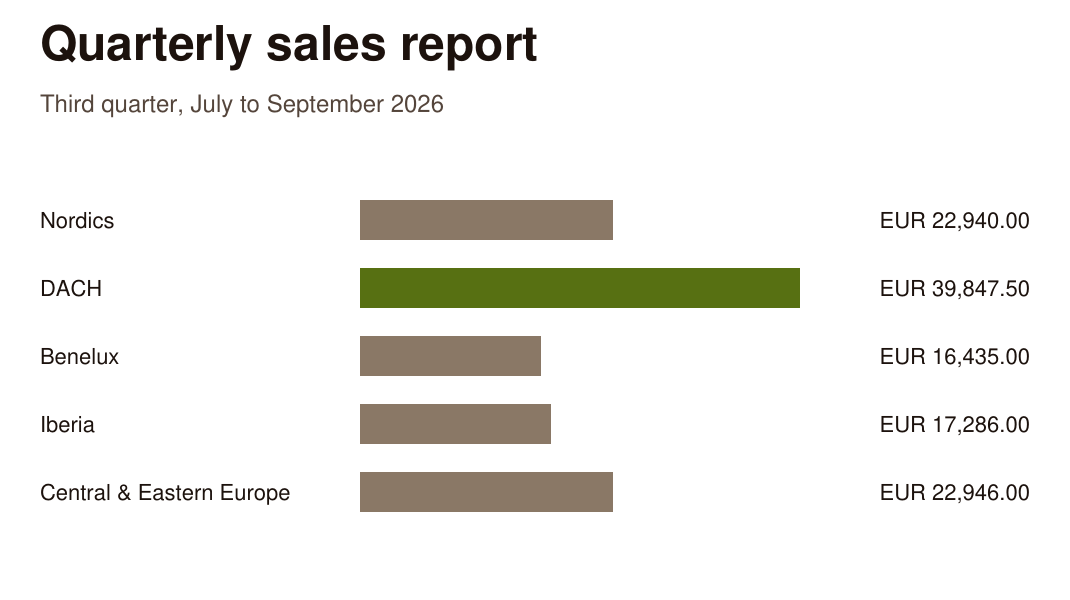
- Made by: a JavaScript writer sent with the run (
lib/pdf.js) - Program: 25 lines; input:
/data/quarter.json, 914 bytes - File:
/out/quarter.pdf, 2,015 bytes, inline in the answer and as a link - A real run on 1 November 2026. The picture: its page, rendered with pdftoppm and cropped.
Word: a quarterly report
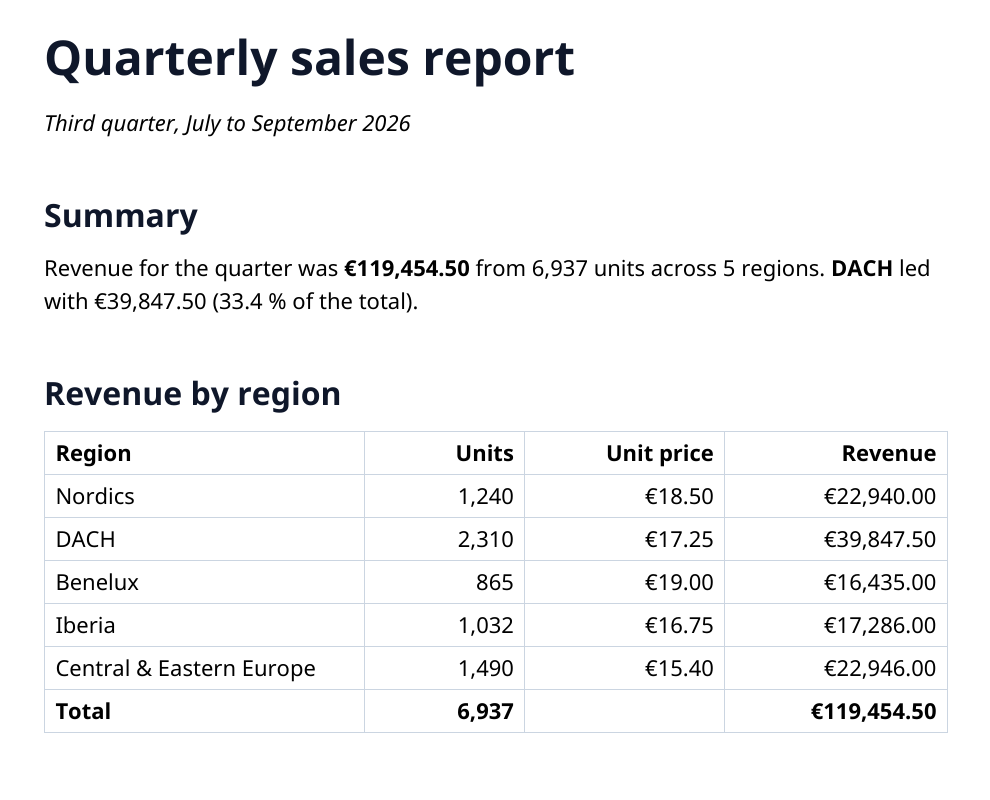
- Made by: a JavaScript writer sent with the run (
lib/docx.js, onshotcup:zip) - Program: 64 lines; input:
/data/quarter.json, 914 bytes - File:
/out/report.docx, 3,713 bytes, inline in the answer and as a link - A real run on 1 November 2026. The picture: its first page, rendered with LibreOffice and cropped.
Excel: a sheet with formulas
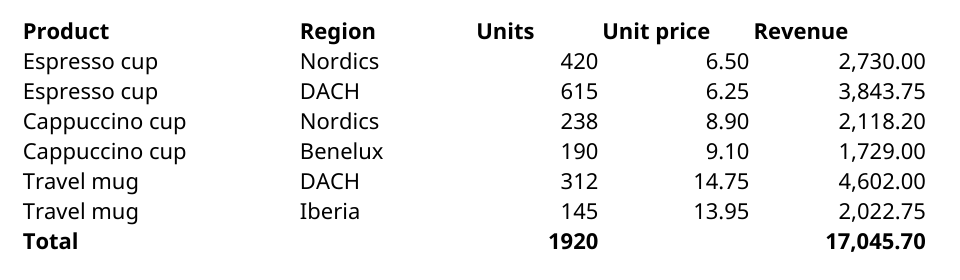
- Made by: a JavaScript writer sent with the run (
lib/xlsx.js, onshotcup:zip) - Program: 56 lines; input:
/data/sales.json, 611 bytes - File:
/out/sales.xlsx, 3,591 bytes, inline in the answer and as a link - A real run on 1 November 2026. The picture: its sheet, rendered with LibreOffice and cropped.
PowerPoint: a four-slide deck
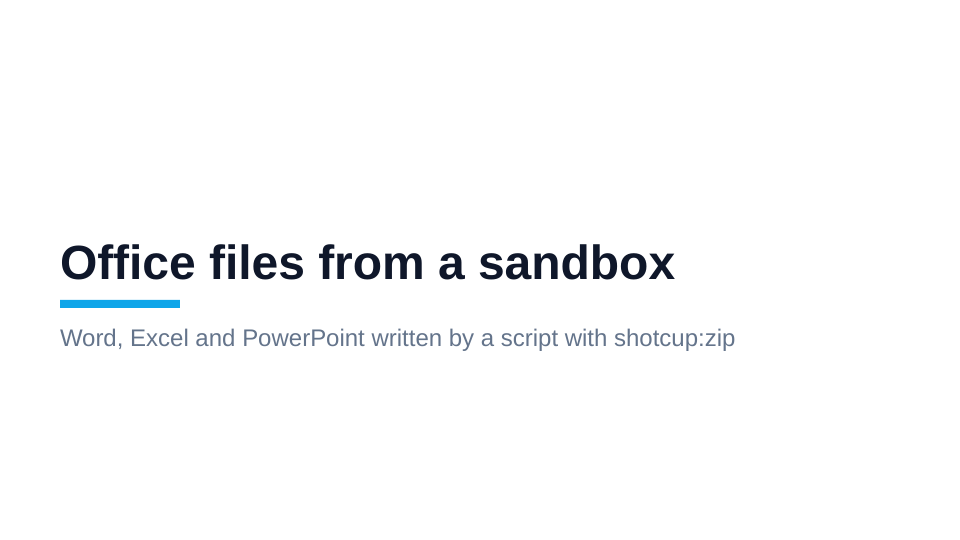
- Made by: a JavaScript writer sent with the run (
lib/pptx.js, onshotcup:zip) - Program: 19 lines; input:
/data/deck.json, 1,039 bytes - File:
/out/deck.pptx, 9,878 bytes, inline in the answer and as a link - A real run on 1 November 2026. The picture: its first slide, rendered with LibreOffice.
ZIP: an export of three files
orders.csv  42,405 bytes
by-region.json  159 bytes
README.txt 32 bytes- Made by:
shotcup:zip - Program: 20 lines; input:
/data/orders.csv, 42,405 bytes - File:
/out/orders-export.zip, 7,061 bytes, inline in the answer and as a link - A real run on 1 November 2026. The picture: its listing, read from the file.
HTML: a page rendered with React
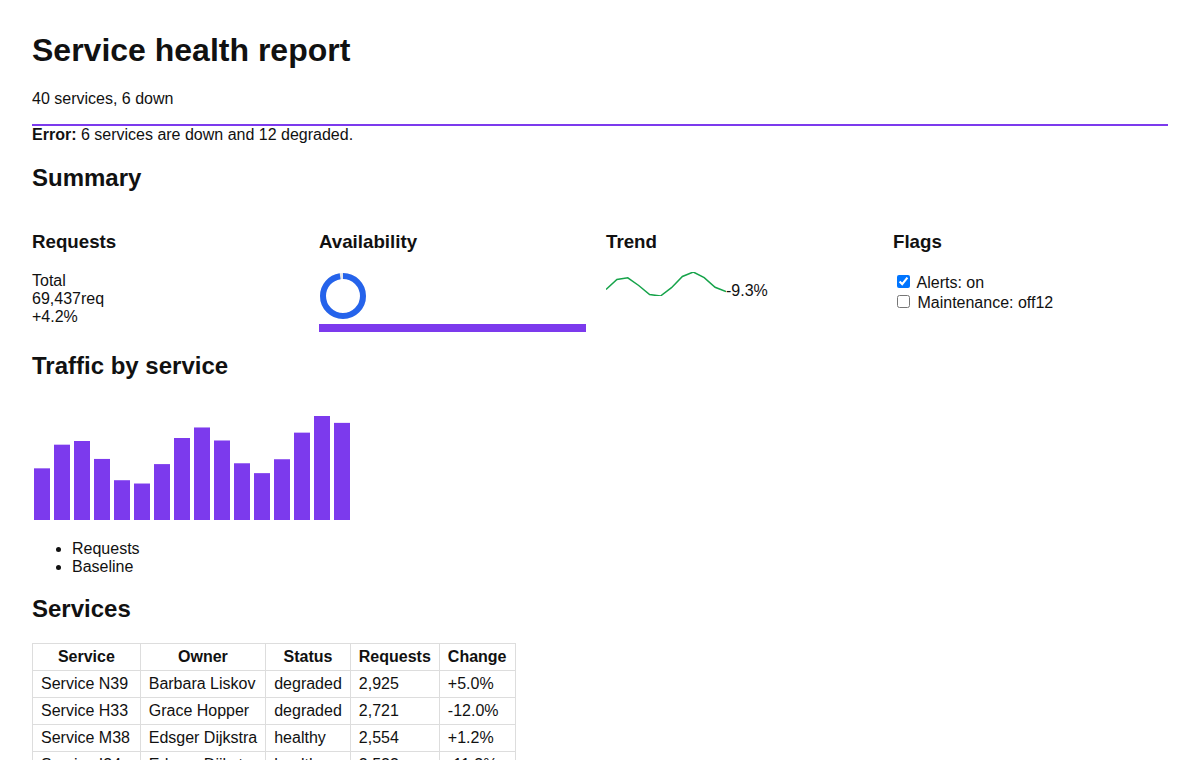
- Made by: React 19, sent with the run
- Program: 105 lines; input: none, the data is in the program
- File:
/out/static.html, 12,848 bytes, inline in the answer and as a link - A real run on 1 November 2026. The picture: the top of the page, opened in Chromium.
From a thousand rows
Both runs were sent the same thousand orders as /data/orders.csv in the request's files.
PNG: a chart from a thousand orders
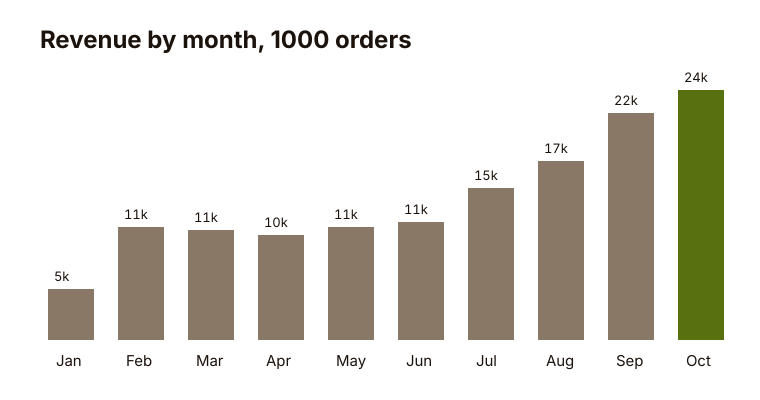
- Made by:
shotcup:canvas - Program: 32 lines; input:
/data/orders.csv, 42,405 bytes - File:
/out/revenue-by-month.png, 14,370 bytes, inline in the answer and as a link - A real run on 1 November 2026. The picture: the file itself.
Excel: a workbook from the same thousand orders
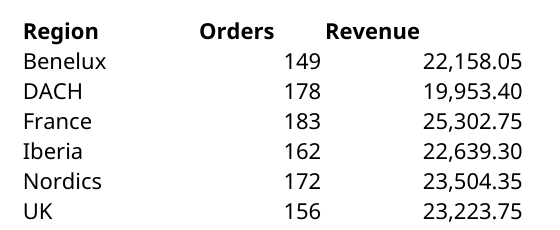
- Made by: a JavaScript writer sent with the run (
lib/xlsx.js, onshotcup:zip) - Program: 33 lines; input:
/data/orders.csv, 42,405 bytes - File:
/out/orders.xlsx, 43,542 bytes, as a link - A real run on 1 November 2026. The picture: its first sheet, rendered with LibreOffice and cropped.
This page as Markdown: /docs/artifacts.md